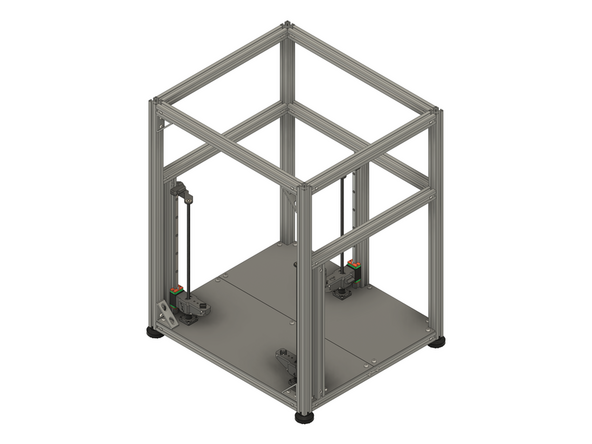
Introduction
Please note: All measurements provided in this guide are based on building a 300x300 V-Core 4.0.
If you are building a machine of a different size, the following adjustments can be made to the stated linear rail and leadscrew lengths:
- 400x400: Add 100mm
- 500x500: Add 200mm
-
-
The following tools are required for this section of the guide:
-
Allen key / hex wrenches in the following sizes: 2.5mm, 3mm & 5mm
-
Avoid using ball end hex wrenches where possible as they are more prone to damaging the heads of smaller screws
-
The following are recommended for this guide:
-
Paper towels
-
Disposable gloves
-
A light oil, such as 3-in-1 or sewing machine oil
-
-
-
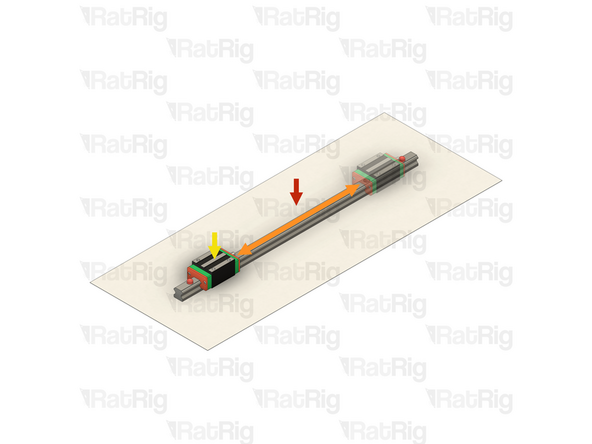
The linear rails are supplied with a protective oil coating on them. It is strongly recommended to prepare your work surface with paper towels and to wear disposable gloves
-
Paper Towels
-
Linear Rail
-
The oil on the rails protects them from rusting. You must either replace this oil after cleaning (as directed below), or make sure not to remove all of the original oil during preparation
-
An easy solution to both protect, and lubricate the rails, is using a light oil such as 3-in-1 or sewing machine oil
-
Apply a small amount of oil to a paper towel and then apply the oil to the rail by wiping it with the oiled paper towel. This may be done prior to, or after the installation of the linear rails
-
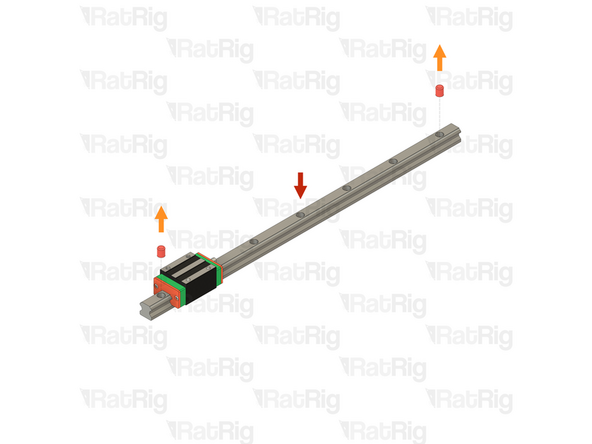
Do not remove the plastic stops installed in the ends of the linear rail at this point as they prevent the carriage from leaving the rail
-
More advanced users may wish to fully grease the rails & carriage with a specialised bearing lubricant. It is important to use the correct grade and make sure there are no additives such as PTFE, graphite, molybdenum disulfide, etc. The recommended grade of grease is EP00 or EP000 as these lubricate well, without being too viscous
-
-
-
With the linear rail still on the absorbent paper towels, carefully and slowly move the carriage from one end of the rail to the other
-
The carriage should move smoothly over the entire length of the rail
-
Small changes in resistance are normal, but the carriage becoming much harder to push, or binding completely are not
-
Repeat the previous test whilst applying a small amount of force downwards on the carriage
-
The carriage will likely travel more smoothly when applying a downwards force, this is normal
-
If the carriage does not move smoothly, or binds completely, refer to the Linear Rail Troubleshooting Guide
-
-
-
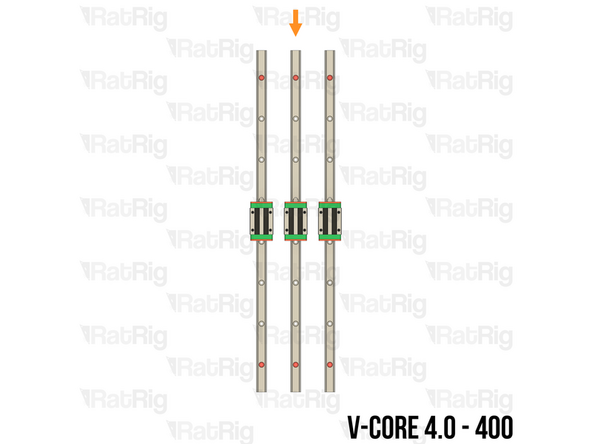
The SKUs for the V-Core 4.0 Z-axis linear rails vary depending on the size:
-
V-Core 4.0 - 300: 3x Linear Rail - HG15 400mm (SKU: HW3672GC)
-
Each rail has seven holes for mounting
-
V-Core 4.0 - 400: 3x Linear Rail - HG15 500mm (SKU: HW3416GC)
-
Each rail has eight holes for mounting
-
V-Core 4.0 - 500: 3x Linear Rail - HG15 600mm (SKU: HW3673GC)
-
Each rail has ten holes for mounting
-
-
-
M4x16 Cap Head Screw (SKU: HW3126SC)
-
T-Nut - Drop In Type for 30 Series - M4 (SKU: HW2774NC)
-
The required quantity of M4x16 Cap Head Screws and T-Nut - Drop In Type for 30 Series - M4 varies depending on size:
-
V-Core 4.0 - 300: 21 of each
-
V-Core 4.0 - 400: 24 of each
-
V-Core 4.0 - 500: 30 of each
-
2x align_3030_hg15 Printed Part (SKU: PP000005)
-
Please note: The alignment tools may have been printed in green or black. The design is the same regardless of colour
-
-
-
Prepared Z-axis linear rail from step 4
-
Remove both of the plastic stops in the linear rail
-
Make sure from this point onwards that the carriage does not leave the end of the linear rail
-
M4x16 Cap Head Screw
-
Insert an M4x16 Cap Head Screw into each mounting hole in the linear rail
-
T-Nut - Drop In Type for 30 Series - M4
-
Loosely thread a T-Nut onto each of the M4x16 Cap Head Screws. Do not tighten them at this point
-
Repeat the above instructions to assemble all three Z-axis linear rails
-
-
-
V-Core 4.0 Frame Assembly - Front-left corner
-
Prepared Z-axis linear rail assembly from the previous step
-
Align the Z-axis linear rail with the extrusion slot as shown
-
Make sure the small grease fitting is facing upwards
-
Make sure that all of the T-Nuts are slotted into the extrusion
-
Install the alignment tools, one near the top of the linear rail and the other near the bottom
-
Secure the linear rail to the frame assembly by tightening all of the M4x16 screws
-
Do not forget to tighten any M4x16 screws which are under the linear rail carriage
-
-
-
Remove both alignment tools
-
Move the carriage to the bottom of the linear rail
-
Repeat both the previous step, and this step to install the front-right Z-axis linear rail
-
Repeat both the previous step, and this step to install the rear Z-axis linear rail
-
-
-
3x NEMA17 Stepper Motor - 48mm (SKU: HW1078EC)
-
3x V-Core 4 Pillow Block - Nylon Injection Part (SKU: HW3848GC)
-
3x Coupler - Rigid Type - Black 25*20mm - 5mm to 8mm (SKU: HW2990GC)
-
3x Thrust Bearing F8-16M (SKU: HW2118WC)
-
12x M3x12 Cap Head Screw (SKU: HW1292SC)
-
-
-
It is recommended to lay the machine assembly on its back to make installation of the Z-axis stepper motors easier
-
NEMA17 Stepper Motor - 48mm
-
Install the stepper motor into the base plate as shown. The connector should face towards the back of the machine. Continue to support the stepper motor until it is secured later in this step
-
V-Core 4 Pillow Block - Nylon Injection Part
-
Place the V-Core 4 Pillow Block over the stepper motor shaft, aligning the four holes with the matching holes in the base plate
-
4x M3x12 Cap Head Screw
-
Insert each M3x12 Cap Head Screw through the Pillow Block, base plate, and thread them into the NEMA17 stepper motor. Once all 4 screws are threaded, fully tighten them to secure the assembly to the base plate
-
-
-
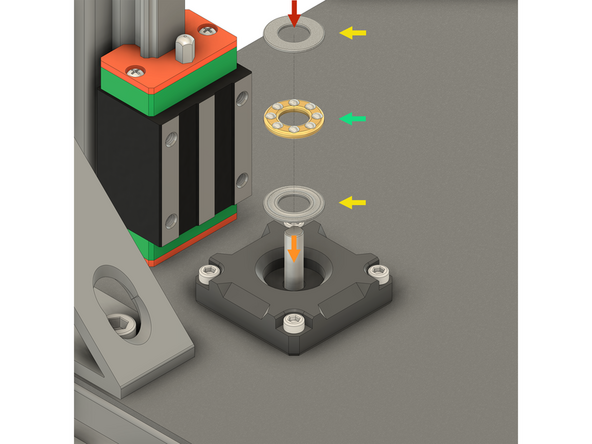
Thrust Bearing F8-16M - Please note: The thrust bearing has 3 components:
-
Install the thrust bearing into the Pillow Block as shown
-
2x End cap
-
Internal bearing race
-
It is recommended to add a drop or two of light oil (such as 3-in-1 or sewing machine oil) to the internal bearing race to lubricate it
-
Coupler - Rigid Type - Black 25*20mm - 5mm to 8mm
-
Install the coupler onto the stepper motor shaft
-
Whilst gently pressing the coupler downwards to compress the thrust bearing, fully tighten the marked M3 Cap Head Screw to secure the coupler to the stepper motor shaft
-
-
-
Repeat step 10 and step 11 to install the front-right Z-axis stepper motor
-
The front-right stepper motor connector should face towards the back of the machine
-
Repeat step 10 and step 11 to install the rear Z-axis stepper motor
-
The rear stepper motor connector should face towards the front of the machine
-
Stand the machine assembly back on its feet at this point, there should be no further need to access the underside until the wiring section of the guide
-
-
-
3x Rat Rig Bi-Material Lead Screw Decoupler (SKU: HW2950WC)
-
3x Leadscrew Nut - POM - TR8x4 (SKU: HW2915GC)
-
6x M3x8 Cap Head Screw (SKU: HW1502SC)
-
-
-
Rat Rig Bi-Material Lead Screw Decoupler
-
Leadscrew Nut - POM - TR8x4
-
Align the Leadscrew Nut with one end of the Bi-Material Leadscrew Decoupler. Make sure that two of the four holes in the Leadscrew Nut align with the threads in the Bi-Material Leadscrew Decoupler
-
2x M3x8 Cap Head Screw
-
Insert each M3x8 Cap Head Screw through the Leadscrew Nut and tighten them into the threads on the Bi-Material Leadscrew Decoupler
-
Prepare three of these assemblies
-
-
-
1x Rear bed arm from step 8 of the Preparations guide
-
2x Front bed arm from step 7 of the Preparations guide
-
6x M4x100 Cap Head Screw (SKU: HW3636SC)
-
6x M4x60 Cap Head Screw (SKU: HW3635SC)
-
1x vc4_arm_cable Printed Part (SKU: PP000264)
-
3x Rat Rig V-Core 4.0 - POM Arm Insert (SKU: HW3616GC)
-
3x M6x12 Cap Head Screw (SKU: HW1836SC)
-
8x M3x8 Cap Head Screw (SKU: HW1502SC)
-
-
-
Front bed arm
-
Leadscrew Decoupler assembly from step 14
-
Install the Leadscrew Decoupler assembly into arm as shown
-
Make sure the screw threads in the Leadscrew Decoupler are aligned with the holes in the front bed arm printed part
-
2x M3x8 Cap Head Screw
-
Insert each M3x8 Cap Head Screw through the bed arm and tighten them into the threads on the Bi-Material Leadscrew Decoupler
-
Assemble both of the front arms
-
-
-
The only difference between the front-left and front-right arms is the angle of the POM arm insert. Use the provided image to make sure the POM arm insert is angled correctly when installed in each of the front arms
-
Front-left arm assembly
-
Front-right arm assembly
-
Rat Rig V-Core 4.0 - POM Arm Insert
-
Push the POM arm insert fully into the arm as shown
-
M6x12 Cap Head Screw
-
Secure the POM arm insert by fastening the M6x12 Cap Head Screw through the underside of the arm and into the POM arm insert
-
Take care not to overtighten the M6x12 Cap Head Screw as you can damage threads in the POM arm insert
-
-
-
Rear bed arm
-
Leadscrew Decoupler assembly from step 14
-
Install the Leadscrew Decoupler assembly into arm as shown
-
Make sure the screw threads in the Leadscrew Decoupler are aligned with the holes in the front bed arm printed part
-
2x M3x8 Cap Head Screw
-
Insert each M3x8 Cap Head Screw through the bed arm and tighten them into the threads on the Bi-Material Leadscrew Decoupler
-
-
-
vc4_arm_cable Printed Part
-
2x M3x8 Cap Head Screw
-
Insert each M3x8 Cap Head Screw through the vc4_arm_cable Printed Part and fasten them into the rear bed arm as shown
-
Rat Rig V-Core 4.0 - POM Arm Insert
-
Push the POM arm insert fully into the arm as shown
-
M6x12 Cap Head Screw
-
Secure the POM arm insert by fastening the M6x12 Cap Head Screw through the underside of the arm and into the POM arm insert
-
Take care not to overtighten the M6x12 Cap Head Screw as you can damage threads in the POM arm insert
-
-
-
Rear arm assembly from step 19
-
2x M4x100 Cap Head Screw
-
Insert each M4x100 Cap Head Screw through the bed arm and tighten them into the top threads linear rail carriage
-
2x M4x60 Cap Head Screw
-
Insert each M4x60 Cap Head Screw through the bed arm and tighten them into the bottom threads linear rail carriage
-
Take care not to overtighten any of the M4 Cap Head Screw as you can damage the printed part
-
Test that the Z-axis still moves smoothly after installing the bed arm
-
If the Z-axis carriage now binds, slightly loosen some or all of the M4 Cap Head Screws to improve the smoothness
-
-
-
Front arm assembly from step 17
-
2x M4x100 Cap Head Screw
-
Insert each M4x100 Cap Head Screw through the bed arm and tighten them into the top threads linear rail carriage
-
2x M4x60 Cap Head Screw
-
Insert each M4x60 Cap Head Screw through the bed arm and tighten them into the bottom threads linear rail carriage
-
Take care not to overtighten any of the M4 Cap Head Screw as you can damage the printed part
-
Test that the Z-axis still moves smoothly after installing the bed arm
-
If the Z-axis carriage now binds, slightly loosen some or all of the M4 Cap Head Screws to improve the smoothness
-
-
-
Front arm assembly from step 17
-
2x M4x100 Cap Head Screw
-
Insert each M4x100 Cap Head Screw through the bed arm and tighten them into the top threads linear rail carriage
-
2x M4x60 Cap Head Screw
-
Insert each M4x60 Cap Head Screw through the bed arm and tighten them into the bottom threads linear rail carriage
-
Take care not to overtighten any of the M4 Cap Head Screw as you can damage the printed part
-
Test that the Z-axis still moves smoothly after installing the bed arm
-
If the Z-axis carriage now binds, slightly loosen some or all of the M4 Cap Head Screws to improve the smoothness
-
-
-
The SKUs for the V-Core 4.0 leadscrews vary depending on the size:
-
V-Core 4.0 - 300: 3x Leadscrew - TR8x4 - 375mm (SKU: HW3751SC)
-
V-Core 4.0 - 400: 3x Leadscrew - TR8x4 - 475mm (SKU: HW3752SC)
-
V-Core 4.0 - 500: 3x Leadscrew - TR8x4 - 575mm (SKU: HW3753SC)
-
-
-
Leadscrew - TR8x4
-
Insert the leadscrew into marked hole on the arm
-
Once the leadscrew tip reaches the threads of the leadscrew nut, rotate the leadscrew clockwise to thread it into the nut
-
Keep rotating the leadscrew until it passes through the arm and insert it fully into the coupler below as shown
-
Fully tighten the upper M3 Cap Head Screw on the coupler to secure the leadscrew into the coupler
-
-
-
Repeat step 24 to install both front leadscrews
-
Front-left leadscrew
-
Front-right leadscrew
-
-
-
1x vc4_z_constraint_left Printed Part (SKU: PP000297)
-
2x vc4_z_constraint_right Printed Part (SKU: PP000298)
-
6x M6x12 Cap Head Screw (SKU: HW1836SC)
-
6x T-Nut - Drop In Type for 30 Series - M6 (SKU: HW1361NC)
-
3x Ball Bearing F688ZZ Flanged 8x16x5 (SKU: HW1309WC)
-
-
-
vc4_z_constraint_left Printed Part
-
Ball Bearing F688ZZ Flanged 8x16x5
-
Insert the Ball Bearing into the printed part, making sure the flange is on the side shown
-
The Ball Bearing is designed to be a tight fit, but it should fit without using excessive force
-
2x M6x12 Cap Head Screw
-
2x T-Nut - Drop In Type for 30 Series - M6
-
Insert an M6x12 Cap Head Screw into each hole in the printed part and then loosely thread a T-Nut onto each. Do not tighten them at this point
-
-
-
vc4_z_constraint_right Printed Part
-
Ball Bearing F688ZZ Flanged 8x16x5
-
Insert the Ball Bearing into the printed part, making sure the flange is on the side shown
-
The Ball Bearing is designed to be a tight fit, but it should fit without using excessive force
-
2x M6x12 Cap Head Screw
-
2x T-Nut - Drop In Type for 30 Series - M6
-
Insert an M6x12 Cap Head Screw into each hole in the printed part and then loosely thread a T-Nut onto each. Do not tighten them at this point
-
Prepare two of these assemblies
-
-
-
V-Core 4.0 Frame Assembly - Front-left corner
-
Left leadscrew constraint assembly from step 27
-
Align the leadscrew constraint with the extrusion slot as shown
-
Make sure that all of the T-Nuts are slotted into the extrusion
-
Slide the leadscrew constraint downwards, fitting the tip of the leadscrew into the Ball Bearing within the leadscrew constraint
-
Position the leadscrew constraint so that the tip of the leadscrew is flush with the Ball Bearing, as shown
-
Fully tighten both M6x12 Cap Head Screws to secure the leadscrew constraint to the extrusion
-
-
-
V-Core 4.0 Frame Assembly - Front-right corner
-
Right leadscrew constraint assembly from step 28
-
Align the leadscrew constraint with the extrusion slot as shown
-
Make sure that all of the T-Nuts are slotted into the extrusion
-
Slide the leadscrew constraint downwards, fitting the tip of the leadscrew into the Ball Bearing within the leadscrew constraint
-
Position the leadscrew constraint so that the tip of the leadscrew is flush with the Ball Bearing, as shown
-
Fully tighten both M6x12 Cap Head Screws to secure the leadscrew constraint to the extrusion
-
-
-
V-Core 4.0 Frame Assembly - Rear Z-axis
-
Right leadscrew constraint assembly from step 28
-
Align the leadscrew constraint with the extrusion slot as shown
-
Make sure that all of the T-Nuts are slotted into the extrusion
-
Slide the leadscrew constraint downwards, fitting the tip of the leadscrew into the Ball Bearing within the leadscrew constraint
-
Position the leadscrew constraint so that the tip of the leadscrew is flush with the Ball Bearing, as shown
-
Fully tighten both M6x12 Cap Head Screws to secure the leadscrew constraint to the extrusion
-
-
-
1x vc4_z_limit_left Printed Part (SKU: PP000299)
-
2x vc4_z_limit_right Printed Part (SKU: PP000300)
-
3x M6x12 Cap Head Screw (SKU: HW1836SC)
-
3x T-Nut - Drop In Type for 30 Series - M6 (SKU: HW1361NC)
-
-
-
vc4_z_limit_left Printed Part
-
M6x12 Cap Head Screw
-
T-Nut - Drop In Type for 30 Series - M6
-
Insert an M6x12 Cap Head Screw into the hole in the printed part and then loosely thread a T-Nut onto it. Do not tighten it at this point
-
-
-
vc4_z_limit_right Printed Part
-
M6x12 Cap Head Screw
-
T-Nut - Drop In Type for 30 Series - M6
-
Insert an M6x12 Cap Head Screw into the hole in the printed part and then loosely thread a T-Nut onto it. Do not tighten it at this point
-
Prepare two of these assemblies
-
-
-
V-Core 4.0 Frame Assembly - Front-left corner
-
Left Z-axis limit assembly from step 33
-
Align the Z-axis limit with the extrusion slot as shown
-
Make sure that the T-Nut is slotted into the extrusion
-
Slide the Z-axis limit downwards until it sits on top of the leadscrew constraint
-
Fully tighten the M6x12 Cap Head Screw to secure the Z-axis limit to the extrusion
-
-
-
V-Core 4.0 Frame Assembly - Front-right corner
-
Right Z-axis limit assembly from step 34
-
Align the Z-axis limit with the extrusion slot as shown
-
Make sure that the T-Nut is slotted into the extrusion
-
Slide the Z-axis limit downwards until it sits on top of the leadscrew constraint
-
Fully tighten the M6x12 Cap Head Screw to secure the Z-axis limit to the extrusion
-
-
-
V-Core 4.0 Frame Assembly - Rear Z-axis
-
Right Z-axis limit assembly from step 34
-
Align the Z-axis limit with the extrusion slot as shown
-
Make sure that the T-Nut is slotted into the extrusion
-
Slide the Z-axis limit downwards until it sits on top of the leadscrew constraint
-
Fully tighten the M6x12 Cap Head Screw to secure the Z-axis limit to the extrusion
-









Cancel: I did not complete this guide.
47 other people completed this guide.